Portable LoRaWAN Mesh Relay Gateway: Raspberry Pi Zero Field Deployment
Understanding Mesh Limitations
Before building a portable mesh relay, understand the fundamental constraint: ChirpStack Gateway Mesh is designed for sparse, low-density deployments. Every relay transmission consumes airtime, and in regions like EU868, strict duty cycle regulations (1% on most channels) limit how much traffic a relay gateway can forward.
The math is straightforward: a relay receives an uplink, then retransmits it toward the border gateway—two transmissions per packet. In multi-hop chains, airtime multiplies with each hop. Deploy too many devices behind a relay, or have them transmit too frequently, and you'll hit duty cycle limits. The relay becomes a bottleneck not due to processing power, but because it legally cannot transmit more.
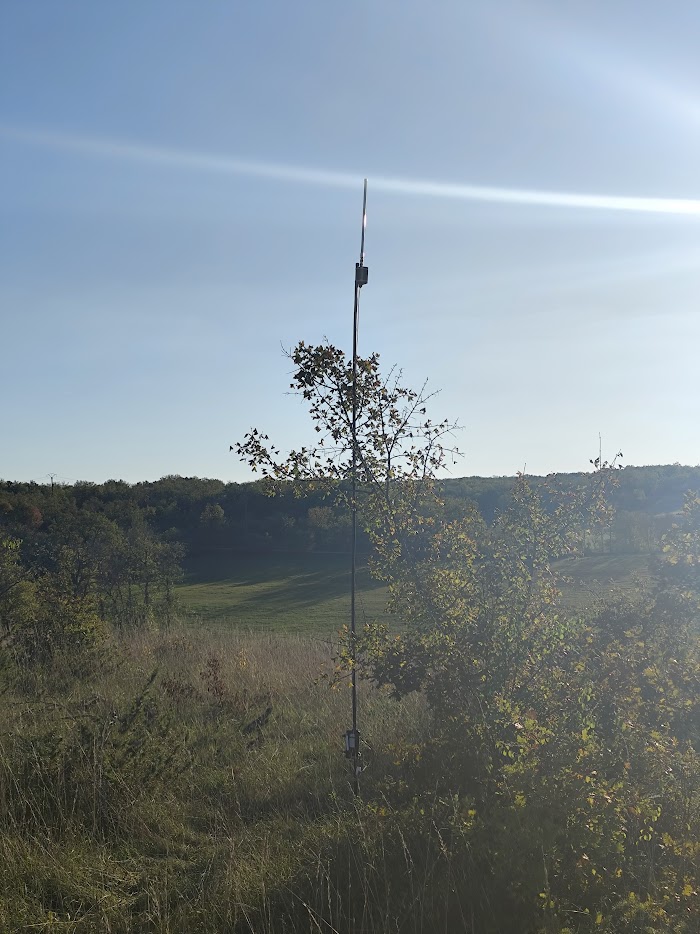
Mesh relays work well for:
- Devices transmitting infrequently (every 15-60 minutes)
- Sparse device density (tens of devices per relay, not hundreds)
- Coverage extension in remote areas
- Field testing and temporary deployments
Mesh is the wrong choice when:
- High device density is required behind relays
- Devices transmit frequently (every few minutes or less)
- You're in a duty-cycle-regulated region with heavy traffic
You can configure DevAddr prefix filtering to control which devices get relayed, preventing the relay from wasting airtime on traffic that should connect directly to other infrastructure.
Why Portable Relay Gateways Matter
With those constraints understood, portable mesh relays excel at what they're designed for: LoRaWAN mesh relay gateways forward packets from end-devices to border gateways via LoRa-to-LoRa relaying without requiring internet connectivity. This makes them perfect for temporary deployments where running power or internet infrastructure is impractical—field testing, event coverage, remote monitoring, or proving coverage before committing to permanent installations.
The Raspberry Pi Zero W paired with the Seeed WM1302 concentrator creates an extremely low-power relay gateway. Combined with a mid-sized USB battery pack, you get multi-day autonomous operation. Throw it in a backpack, hike to elevated positions, mount it temporarily to test coverage gaps, or deploy in remote areas without any infrastructure. When the test period ends or you've gathered the data you need, simply retrieve it and move to the next location.
Hardware Build
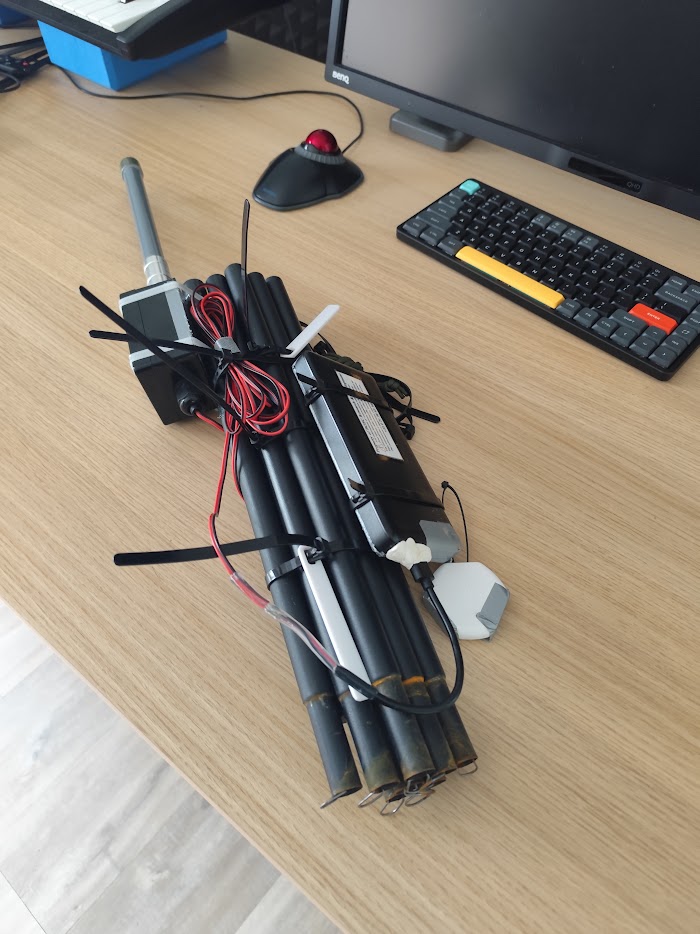
Core components:
- Raspberry Pi Zero W
- Seeed WM1302 LoRaWAN Gateway Module (SX1302-based Pi HAT)
- USB battery pack (10,000-20,000mAh range typical)
- microSD card (16GB minimum)
Seeed WM1302 specifications:
The WM1302 uses the Semtech SX1302 baseband chip—the same concentrator found in modern commercial gateways but in a compact Pi HAT form factor. The module integrates a GPS receiver supporting GPS L1, GLONASS L1, and BeiDou B1 for accurate timing and location data. Sensitivity reaches -139dBm at SF12, matching or exceeding older SX1301-based concentrators while consuming less power.
The hardware comes in EU868 and US915 frequency variants—order the correct version for your region. Physical dimensions of 56×65mm make it one of the most compact LoRaWAN concentrators available. The mini-PCIe module plugs into a Pi HAT adapter that connects to the Raspberry Pi's 40-pin GPIO header.
Why Raspberry Pi Zero W:
The Pi Zero W provides just enough computing power for relay gateway functions without overkill. A 1GHz single-core CPU with 512MB RAM handles packet forwarding efficiently. Built-in WiFi and Bluetooth enable configuration without needing to attach a monitor—connect wirelessly, configure via web interface, then deploy. The 40-pin GPIO header provides full compatibility with the WM1302 HAT, and the compact 65×30mm form factor keeps the entire assembly small enough for backpack deployment.
Power consumption and battery life:
The combination draws minimal power—low enough that consumer USB battery packs provide multi-day operation. Actual runtime depends on battery capacity, conversion efficiency, ambient temperature, and gateway activity (transmit/receive duty cycle). A standard 10,000-20,000mAh USB battery pack typically provides several days of continuous operation, making this viable for field testing and temporary deployments without needing to return daily for recharging.
ChirpStack Gateway OS Installation
ChirpStack Gateway OS is an OpenWrt-based embedded operating system designed for LoRa gateways. It includes ChirpStack Gateway Mesh component for relay functionality.
Download and flash:
- Download ChirpStack Gateway OS for Raspberry Pi from chirpstack.io
- Flash SD card using Balena Etcher
- Insert SD card into Raspberry Pi Zero W
- Power on and wait for first boot (creates WiFi access point)
Initial access:
- Gateway creates access point: "ChirpStackAP-XXXXXX"
- Default password: "ChirpStackAP"
- Connect to access point
- Access web interface: http://192.168.0.1
Configure as relay gateway:
- Access LuCI web interface
- Navigate to ChirpStack Gateway Mesh configuration
- Enable relay mode (disable border gateway mode)
- Set AES128 mesh signing key (same across all gateways in network)
- Configure LoRa concentrator (automatic detection for WM1302)
- Set frequency plan (EU868, US915, etc.)
- Save and reboot
Key configuration settings:
[mesh]
enabled=true
signing_key="your-shared-aes128-key"

[mesh.relay]
enabled=true
No network server configuration needed - relay only forwards packets between LoRa interfaces.
WM1302 HAT Setup
The Seeed WM1302 connects via mini-PCIe interface and 40-pin header. ChirpStack Gateway OS includes automatic detection and configuration for this concentrator.
Hardware connection:
- WM1302 module plugs into mini-PCIe slot on Pi HAT
- Pi HAT connects to Raspberry Pi Zero W 40-pin GPIO header
- Power via micro USB (Raspberry Pi Zero W standard port)
- GPS antenna connects to U.FL connector on WM1302 (optional)
- LoRa antenna connects to U.FL connector on WM1302 (required)
Antenna selection:
The WM1302 ships with a basic antenna suitable for initial testing and short-range deployments. For better range, consider upgrading to higher-gain antennas matched to your frequency band. Keep antennas away from metal enclosures—metal significantly attenuates RF signals and reduces performance. For optimal mounting, use an external antenna with an extension cable, allowing you to position the antenna outside any weatherproof enclosure while keeping electronics protected.
Field Deployment Strategy
Backpack portability:
The complete gateway assembly—Pi Zero W, WM1302 HAT, battery pack, and enclosure—fits easily in a standard backpack. Lightweight enough for all-day field work, you can hike to elevated positions, clear areas, or specific coverage gaps to test where relay placement delivers the best results.
Temporary mounting:
Field testing doesn't require permanent infrastructure. Velcro straps secure the gateway to trees, poles, or existing infrastructure. Magnetic mounts work well for metal structures like utility poles or building facades. Zip ties provide quick attachment to almost anything (check local regulations before attaching to utility infrastructure). For ground-level testing, a weighted base prevents wind from toppling the setup.
Weather protection:
The Raspberry Pi Zero and WM1302 have no weatherproofing—they need an external enclosure for outdoor deployment. IP65-rated plastic boxes work well and cost little. Waterproof dry bags provide flexible, lightweight protection for short-term field tests. For longer deployments or repeated use, 3D-printed custom enclosures with cable glands provide clean cable routing while maintaining weather seals. Critical: ensure antenna connections stay weatherproof—water ingress at the U.FL connector will kill the concentrator.
Positioning strategy:
Height matters more than transmit power. Even modest elevation gain—mounting the gateway a few meters above ground level—significantly improves range compared to ground-level placement. Line-of-sight to the border gateway (or next relay in the chain) is crucial for reliable relay-to-relay links. Dense foliage attenuates LoRa signals more than you'd expect—avoid placing relays deep in vegetation if possible. Test coverage thoroughly before committing to permanent installations or equipment purchases.
Use Cases
Range Testing
Deploy relay gateway at increasing distances from border gateway. Measure packet success rate, RSSI, SNR at each position. Identify maximum reliable range for relay-to-border gateway links.
Testing procedure:
- Start at border gateway location
- Move relay gateway 1km increments
- Send test packets from end-device
- Log packet reception at border gateway
- Record RSSI/SNR values
- Map coverage boundaries
Event Coverage
Temporary network for outdoor events, festivals, construction sites. Deploy relay gateways to extend coverage from permanent border gateway installation.
Example: music festival:
- Border gateway: main venue building (internet connection)
- Relay gateway 1: backstage area (100m from border)
- Relay gateway 2: parking lot (500m from border)
- Coverage: entire festival grounds without running cables
Remote Monitoring
Agricultural fields, environmental monitoring, wildlife tracking—scenarios where relay gateways sit in locations without power or internet infrastructure. Deploy the relay gateway powered by battery initially, then add a small solar panel with charge controller for extended or permanent operation.
Solar power extension:
Adding solar capability transforms temporary battery-powered deployment into long-term autonomous operation. A small solar panel paired with a charge controller keeps the battery topped up. In sunny climates, this provides continuous operation with the battery bank handling nights and cloudy periods. Solar components are readily available and sized appropriately for the low power consumption of Pi Zero-based gateways.
Coverage Gap Filling
Urban deployments with dead zones (underground parking, dense buildings). Temporarily deploy relay gateway to test if permanent installation justified.
Decision making:
- 3-4 day battery test proves coverage improvement
- Collect packet success statistics
- If successful: install permanent relay with PoE or solar
- If marginal: try different mounting location
Performance Characteristics
Range expectations:
Relay-to-border gateway range depends heavily on terrain, antenna height, and obstacles. Rural environments with clear line-of-sight provide significantly longer ranges than urban settings with buildings blocking signals. End-device to relay ranges follow standard LoRaWAN gateway patterns. The mesh protocol supports up to 8 hops total (including all relays in the chain), providing extensive coverage extension capability for large deployments.
Latency impact:
Each relay hop introduces latency due to LoRa air time and packet processing. For typical sensor monitoring applications where devices transmit every few minutes, this latency is acceptable. For real-time control applications requiring fast actuator response, the cumulative delay through multiple hops may be problematic—test your specific use case before deployment.
Packet overhead:
The ChirpStack Gateway Mesh protocol adds 14 bytes per uplink packet for encapsulation headers and message integrity codes. LoRaWAN already imposes strict payload size limits that vary by spreading factor and region. SF12 provides longest range but smallest maximum payload—the 14-byte overhead matters more at higher spreading factors. Plan your device payload sizes accounting for this mesh overhead.
Capacity:
A single relay gateway handles many devices simultaneously. Actual capacity depends on device transmission frequency, spreading factors in use, regulatory duty cycle limits (EU868 has 1% duty cycle restrictions), and the number of simultaneous transmissions. The Raspberry Pi Zero's processing power is sufficient for relay functions—RF channel capacity and duty cycle regulations become the limiting factors before CPU limitations.
Limitations and Considerations
Not a permanent solution: Battery operation is temporary by nature. For permanent relay deployments, add:
- Solar panel + charge controller + larger battery
- PoE if Ethernet available
- AC power with UPS backup
Weather vulnerability: Raspberry Pi Zero is not weatherproof. Requires external enclosure. Exposed connectors (USB power, antenna) need protection from water ingress.
No remote management: Unlike border gateways, relays have no internet connection. Configuration changes require physical access or temporary WiFi connection.
Limited processing power: Raspberry Pi Zero W has single-core 1GHz CPU. Sufficient for relay function, but don't expect heavy processing. Relay firmware handles packet forwarding efficiently.
RF interference: Raspberry Pi generates some RF noise. Keep concentrator module as far from Pi as possible (Pi HAT form factor helps). Use shielded antenna cables for long runs.
Building Multiple Relay Gateways
Batch assembly approach:
Building multiple identical relay gateways streamlines field testing and deployment. Pre-flash microSD cards with working configurations—clone one tested setup rather than configuring each gateway individually. Label each gateway with a unique identifier for tracking and troubleshooting. Document mesh signing keys securely since all gateways in your network share the same key. Create a portable test kit with spare battery pack, antenna, and short cables for field troubleshooting.
Cost advantages:
DIY relay gateways built from Raspberry Pi Zero W and WM1302 modules cost significantly less than commercial relay gateway hardware. The price difference becomes more significant when deploying multiple gateways—building five or ten DIY units costs a fraction of equivalent commercial solutions. Component availability is excellent, with multiple distributors carrying both Raspberry Pi and Seeed products globally.
Scaling deployment:
Use the same mesh signing key across all gateways in your network—this allows any relay to communicate with any border gateway. Assign unique gateway IDs for tracking and identifying which relay handled specific packets. Standardized enclosures simplify field deployment—you know exactly what works and can prepare mounting hardware in advance. Document tested mounting locations with GPS coordinates and photos for future reference or troubleshooting.
What I Provide
Services:
- Relay gateway design and assembly guidance for portable and permanent deployments
- ChirpStack Gateway OS configuration and mesh network setup
- Field deployment planning and positioning strategy
- Coverage testing methodology and data analysis
- Power system design (battery, solar, PoE options)
- Weatherproofing and enclosure recommendations
- Integration with existing LoRaWAN infrastructure
You own everything:
- Complete system build documentation and assembly instructions
- Configuration files and deployment scripts
- Field testing data and coverage analysis
- All source code for custom integrations
- No recurring licensing fees or vendor lock-in
Hardware (you source):
- Raspberry Pi or other gateway hardware
- LoRaWAN concentrator modules
- Power systems (batteries, solar panels, charge controllers)
- Weatherproof enclosures and mounting hardware
- Antennas and RF components
I don't sell hardware. I specify what you need based on your deployment requirements, provide detailed build instructions, and configure the open-source software stack to create reliable mesh relay gateways that solve your coverage problems.
Portable vs Permanent Relay Gateways
Portable advantages:
- Test coverage before permanent installation investment
- Flexible positioning during optimization phase
- Temporary events and short-term projects
- Lower initial cost (no solar/mounting infrastructure)
When to upgrade to permanent:
- Proven coverage benefit over 3-4 day test period
- Consistent packet success rate improvement
- Location suitable for solar panel or PoE installation
- Long-term deployment justified by application
Permanent relay requirements:
Permanent installations need reliable long-term power. Solar panels with charge controllers and appropriately-sized battery banks provide autonomous operation in locations without grid power. PoE works when Ethernet is available, though relay locations rarely have wired network access. Weatherproof enclosures rated IP65 or higher protect electronics from the elements. Secure mounting (pole mounts, wall brackets, dedicated masts) prevents theft and weather damage. Elevated installations in exposed locations require lightning protection to avoid equipment damage.
Portable relay gateways prove the concept and gather field data. Permanent relay deployments scale the solution for long-term operation.
Ready to Get Started?
Get expert guidance on implementing LoRaWAN solutions for your organization.
Let's Talk